Entdecken Sie die Smart-Home-Welt mit der TaHoma Switch
Die TaHoma Switch verwandelt Ihr Zuhause in einen Ort, der mitdenkt, unterstützt und den Alltag einfacher und komfortabler macht.
3. Generation
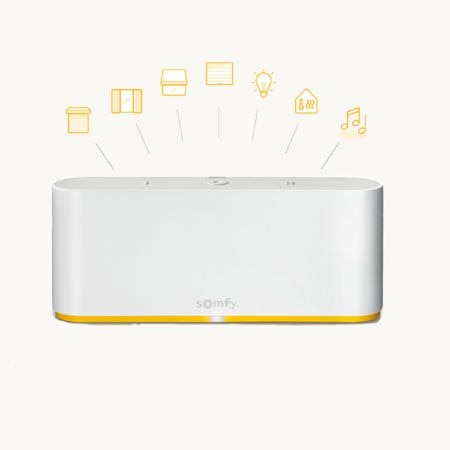
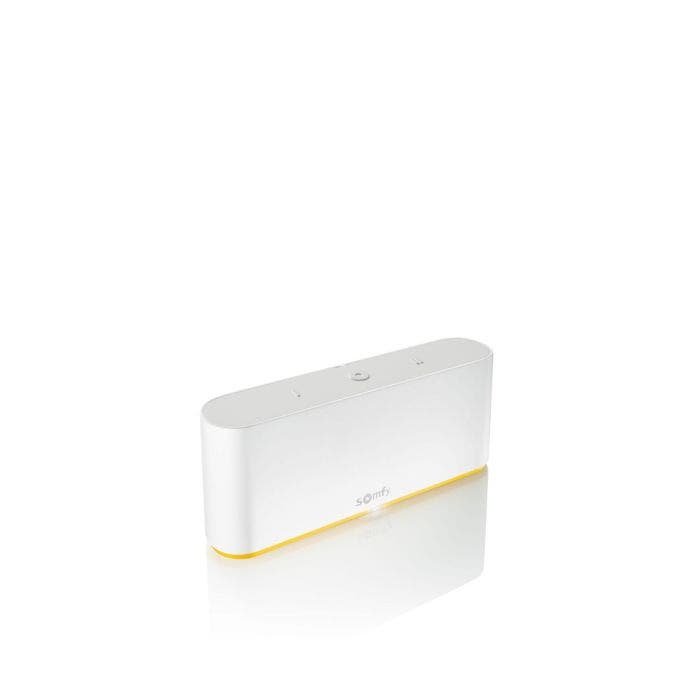
Die Somfy Smart-Home-Steuerung TaHoma Switch
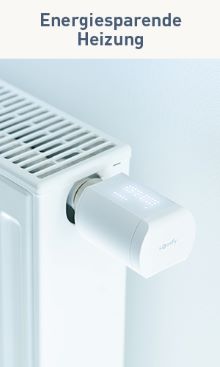
Die TaHoma Switch vereint die wichtigen Komponenten Ihres Zuhauses, Rollläden, Lichtsteuerung, Heizung und Sicherheit, und steuert sie zentral per App. Dank WLAN positionieren Sie die Zentrale flexibel, und mit einem Knopfdruck starten Sie Szenarien, zum Beispiel „Gehen": Rollläden fahren herunter, das Licht schaltet sich aus und das Alarmsystem wird aktiviert.
Ihr individuelles Smart Home
Immer informiert, per Smartphone und Tablet
Behalten Sie überall die Kontrolle über Ihr smartes Zuhause, auch von unterwegs. Im Büro und nicht sicher, ob das Licht aus ist? Ein Blick aufs Smartphone genügt (Somfy Licht-Empfänger io nötig).
Individuelle Szenarien nehmen Alltagsaufgaben ab
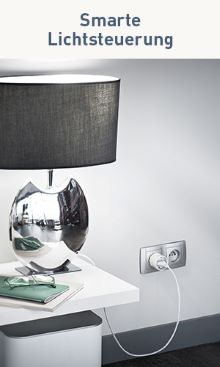
Sobald es dämmert, fahren Ihre Rollläden im Wohnzimmer herunter und die Stehlampe schaltet sich für eine gemütliche Atmosphäre ein (Funk-Zwischenstecker Plug io und Funk-Rollladenmotor nötig). In wenigen Schritten legen Sie Szenarien und Abläufe nach Ihren Bedürfnissen fest.
Anwesenheitssimulation für mehr Sicherheit
Im Urlaub macht Ihr Haus einen bewohnten Eindruck: Die Rollläden fahren regelmäßig hoch und herunter und die Beleuchtung schaltet sich automatisch ein.
Mehr Komfort dank Sprachsteuerung
Verknüpfen Sie Ihre TaHoma Switch mit einem Sprachassistenten und steuern Sie Rollläden, Lampen, Heizung und mehr per Sprachbefehl (Sprachassistent wie Amazon Alexa oder Google Home optional nötig).
Weitere Partner: Über die TaHoma Switch binden Sie weitere Anbieter ein, zum Beispiel Sonos-Lautsprecher in Ihre Szenarien.
Kundenbewertungen
Technische Daten
Funksteuerung
io-homecontrol®, RTS, Zigbee 3.0, EnOcean
Funkfrequenz io
868–870 MHz
Funkfrequenz RTS
433,42 MHz
Funkfrequenz Zigbee 3.0
2,4 GHz
Funkfrequenz WLAN
2,4 GHz
Betriebsspannung
5 V DC
Spannungsversorgung
110 / 230 V AC, 50/60 Hz
Schutzart
IP 20
Betriebstemperatur
0 °C bis 40 °C
Abmessungen (B x H x T)
162 x 67 x 35 mm
Anschluss
1x Micro USB
Funkreichweite
io ca. 20 m, RTS ca. 15 m, jeweils durch zwei Betonwände
Integrierbare Produkte
200 Stück
Kompatibilität
Kann ich die TaHoma Switch bei mir nutzen?
Steuern Sie Ihre Somfy Produkte bereits per Funk, zum Beispiel mit einer Fernbedienung, können Sie die TaHoma Switch direkt einsetzen.
Müssen Sie zum Öffnen und Schließen einen Schalter drücken, ist zuerst eine Funk-Nachrüstung nötig, zum Beispiel mit dem Funkempfänger Smoove Uno A/M io.
Die TaHoma Switch ist mit allen TaHoma-Zubehörprodukten mit io- und RTS-Funk kompatibel. Zusätzlich lassen sich Zigbee 3.0 und EnOcean integrieren (für EnOcean sind der USB Adapter für EnOcean und das TaHoma EnOcean Modul nötig). Baugleich mit Artikelnummer 1870594.
Verbinden Sie die TaHoma mit Apple HomeKit und steuern Sie damit Ihre io-Antriebe (RTS-Antriebe nicht kompatibel). Die Produktkompatibilität kann je nach Land variieren.
Navigating through the elements of the carousel is possible using the tab key. You can skip the carousel or go straight to carousel navigation using the skip links.
Press to skip carousel
TOP
TOP
TOP
NEU
Diese Artikel könnten Ihnen eventuell auch gefallen!
Navigating through the elements of the carousel is possible using the tab key. You can skip the carousel or go straight to carousel navigation using the skip links.
Press to skip carousel
Lieferung
https://shop.somfy.de/tahoma-switch-aktion.html?___store=DE_DE3490Somfy TaHoma Switch Aktionhttps://shop.somfy.de/media/catalog/product/s/m/smart-control-tahoma-switch-without-hand.jpg149149EURInStock<div style="color: #25485a;">
<p style="margin: 0 0 10px; color: #25485a;"><strong>Highlights unserer Smart-Home-Zentrale TaHoma:</strong></p>
<ul style="list-style: none; padding-left: 0; margin: 0 0 20px;">
<li style="margin: 0 0 10px; font-size: 15px; color: #25485a; line-height: 1.6;"><span style="color: #25485a; font-weight: bold;">✔</span> Die neue Somfy Smart-Home-Zentrale der dritten Generation: <strong>TaHoma Switch</strong>.</li>
<li style="margin: 0 0 10px; font-size: 15px; color: #25485a; line-height: 1.6;"><span style="color: #25485a; font-weight: bold;">✔</span> Steuern Sie Ihr Zuhause <strong>automatisiert und smart per Smartphone und Tablet</strong>, von überall.</li>
<li style="margin: 0 0 10px; font-size: 15px; color: #25485a; line-height: 1.6;"><span style="color: #25485a; font-weight: bold;">✔</span> <strong>Flexibel positionierbar</strong>, Verbindung per WLAN.</li>
<li style="margin: 0 0 10px; font-size: 15px; color: #25485a; line-height: 1.6;"><span style="color: #25485a; font-weight: bold;">✔</span> Mit der Smart-Home-App von unterwegs Rollläden herunterfahren, Licht und Heizung ausschalten, Alarm einschalten und mehr.</li>
<li style="margin: 0 0 10px; font-size: 15px; color: #25485a; line-height: 1.6;"><span style="color: #25485a; font-weight: bold;">✔</span> <strong>Individuelle Szenarien</strong> per Knopfdruck und automatisiert starten.</li>
<li style="margin: 0 0 10px; font-size: 15px; color: #25485a; line-height: 1.6;"><span style="color: #25485a; font-weight: bold;">✔</span> Das <strong>Gehirn Ihres smarten Zuhauses</strong>: vernetzt alle smarten <a style="color: #fab800; text-decoration: underline;" href="https://shop.somfy.de/rund-um-tahoma.html" target="_blank" rel="noopener">Geräte</a>, <a style="color: #fab800; text-decoration: underline;" href="https://shop.somfy.de/somfy-renovierungskit-funk.html" target="_blank" rel="noopener">Motoren</a> und <a style="color: #fab800; text-decoration: underline;" href="https://shop.somfy.de/rund-um-tahoma/sensoren.html" target="_blank" rel="noopener">Sensoren</a> und ist jederzeit erweiterbar.</li>
</ul>
<p style="margin: 16px 0 10px; color: #25485a;"> </p>
<p style="margin: 16px 0 10px; color: #25485a;"><strong>Kompatibel mit</strong></p>
<p style="margin: 0 0 8px;"><a href="/kompatibilitaet"><img style="display: block;" src="{{media url="wysiwyg/somfy-onlineshop-kompatibilitaet-io_3.jpg"}}" alt="Somfy Kompatibilität io" width="240" height="59"></a></p>
<p style="margin: 0 0 16px;"><a href="/kompatibilitaet"><img style="display: block;" src="{{media url="wysiwyg/somfy-onlineshop-kompatibilitaet-RTS_1.jpg"}}" alt="Somfy Kompatibilität RTS"></a></p>
<p style="margin: 0;"><a title="Smart Home Ready" href="https://shop.somfy.de/smart-home-ready"><img style="display: block;" src="{{media url=".renditions/wysiwyg/somfy_smart_home_ready_3c.png"}}" alt="Smart Home Ready" width="189" height="156"></a></p>
</div> <style>
@media (max-width:768px){
.sh-row{display:block !important;}
.sh-col{display:block !important;width:100% !important;padding:0 !important;margin-bottom:20px !important;}
.sh-col-img{display:block !important;width:100% !important;padding:0 !important;margin-bottom:16px !important;}
.sh-section{padding:28px 0 !important;}
.sh-h2{font-size:20px !important;}
.sh-h3{font-size:16px !important;}
.sh-ico-cell{display:block !important;width:100% !important;padding:0 !important;text-align:left !important;margin-bottom:8px !important;}
.sh-tiles td{display:block !important;width:100% !important;}
}
</style>
<div style="color:#25485a;">
<!-- 1. Video -->
<div class="sh-section" style="padding:40px 0; border-bottom:1px solid #e8e8e8;">
<h2 class="sh-h2" style="margin:0 0 16px; font-size:24px; font-weight:bold; line-height:1.25; color:#25485a;">Entdecken Sie die Smart-Home-Welt mit der TaHoma Switch</h2>
<p style="margin:0 0 24px; font-size:15px; color:#25485a; line-height:1.7;">Die TaHoma Switch verwandelt Ihr Zuhause in einen Ort, der mitdenkt, unterstützt und den Alltag einfacher und komfortabler macht.</p>
<div style="position:relative; width:100%; padding-bottom:56.25%; height:0; overflow:hidden; border-radius:3px;">
<iframe style="position:absolute; top:0; left:0; width:100%; height:100%; border:0;" src="https://www.youtube.com/embed/jgnMjW5sv44?list=PLaomGAgNvpjfw9a7mQ3OCZtXQp3Rpm4lq" title="Somfy TaHoma Switch" allow="accelerometer; autoplay; clipboard-write; encrypted-media; gyroscope; picture-in-picture" allowfullscreen></iframe>
</div>
</div>
<!-- 2. 3. Generation, Bild links -->
<div class="sh-section" style="padding:40px 0; border-bottom:1px solid #e8e8e8;">
<table class="sh-row" style="width:100%; border-collapse:collapse;">
<tbody><tr>
<td class="sh-col-img" style="width:50%; vertical-align:middle; padding-right:40px;"><img style="display:block; width:100%; height:auto; border-radius:3px;" src="{{media url="wysiwyg/ceba/Smart-Home_TaHoma-Switch.jpg"}}" alt="Somfy TaHoma Switch" loading="lazy"></td>
<td class="sh-col" style="width:50%; vertical-align:middle;">
<p style="margin:0 0 8px; font-size:12px; font-weight:bold; letter-spacing:0.12em; text-transform:uppercase; color:#fab800;">3. Generation</p>
<h3 class="sh-h3" style="margin:0 0 10px; font-size:18px; font-weight:bold; color:#25485a; line-height:1.3;">Die Somfy Smart-Home-Steuerung TaHoma Switch</h3>
<p style="margin:0; font-size:15px; color:#25485a; line-height:1.7;">Die TaHoma Switch vereint die wichtigen Komponenten Ihres Zuhauses, Rollläden, Lichtsteuerung, Heizung und Sicherheit, und steuert sie zentral per App. Dank WLAN positionieren Sie die Zentrale flexibel, und mit einem Knopfdruck starten Sie Szenarien, zum Beispiel „Gehen": Rollläden fahren herunter, das Licht schaltet sich aus und das Alarmsystem wird aktiviert.</p>
</td>
</tr></tbody></table>
</div>
<!-- 3. Ihr individuelles Smart Home: Zebra-Tabelle, Bild links -->
<div class="sh-section" style="padding:40px 0; border-bottom:1px solid #e8e8e8;">
<p style="margin:0 0 18px; font-size:12px; font-weight:bold; letter-spacing:0.12em; text-transform:uppercase; color:#fab800;">Ihr individuelles Smart Home</p>
<table style="width:100%; border-collapse:collapse;">
<tbody>
<tr>
<td class="sh-ico-cell" style="width:24%; vertical-align:top; background:#f7f7f7; padding:16px 18px;"><img src="{{media url="wysiwyg/ceba/smarthpone-schwarz.jpg"}}" alt="Immer informiert" style="max-width:100%; height:auto; display:block; border-radius:3px;"></td>
<td class="sh-col" style="width:76%; vertical-align:top; background:#f7f7f7; padding:16px 18px;">
<h3 class="sh-h3" style="margin:0 0 6px; font-size:18px; font-weight:bold; color:#25485a;">Immer informiert, per Smartphone und Tablet</h3>
<p style="margin:0; font-size:15px; color:#25485a; line-height:1.7;">Behalten Sie überall die Kontrolle über Ihr smartes Zuhause, auch von unterwegs. Im Büro und nicht sicher, ob das Licht aus ist? Ein Blick aufs Smartphone genügt (<a style="color:#fab800; text-decoration:underline;" href="https://shop.somfy.de/licht-empfanger-io-an-aus.html" target="_blank" rel="noopener">Somfy Licht-Empfänger io</a> nötig).</p>
</td>
</tr>
<tr>
<td class="sh-ico-cell" style="width:24%; vertical-align:top; padding:16px 18px;"><img src="{{media url="wysiwyg/ceba/Szenario.jpg"}}" alt="Individuelle Szenarien" style="max-width:100%; height:auto; display:block; border-radius:3px;"></td>
<td class="sh-col" style="width:76%; vertical-align:top; padding:16px 18px;">
<h3 class="sh-h3" style="margin:0 0 6px; font-size:18px; font-weight:bold; color:#25485a;">Individuelle Szenarien nehmen Alltagsaufgaben ab</h3>
<p style="margin:0; font-size:15px; color:#25485a; line-height:1.7;">Sobald es dämmert, fahren Ihre Rollläden im Wohnzimmer herunter und die Stehlampe schaltet sich für eine gemütliche Atmosphäre ein (<a style="color:#fab800; text-decoration:underline;" href="https://shop.somfy.de/somfy-funk-zwischenstecker-plug-io-on-off.html" target="_blank" rel="noopener">Funk-Zwischenstecker Plug io</a> und <a style="color:#fab800; text-decoration:underline;" href="https://shop.somfy.de/somfy-renovierungskit-funk.html" target="_blank" rel="noopener">Funk-Rollladenmotor</a> nötig). In wenigen Schritten legen Sie Szenarien und Abläufe nach Ihren Bedürfnissen fest.</p>
</td>
</tr>
<tr>
<td class="sh-ico-cell" style="width:24%; vertical-align:top; background:#f7f7f7; padding:16px 18px;"><img src="{{media url="wysiwyg/ceba/Anwesenheitssimulation.jpg"}}" alt="Anwesenheitssimulation" style="max-width:100%; height:auto; display:block; border-radius:3px;"></td>
<td class="sh-col" style="width:76%; vertical-align:top; background:#f7f7f7; padding:16px 18px;">
<h3 class="sh-h3" style="margin:0 0 6px; font-size:18px; font-weight:bold; color:#25485a;">Anwesenheitssimulation für mehr Sicherheit</h3>
<p style="margin:0; font-size:15px; color:#25485a; line-height:1.7;">Im Urlaub macht Ihr Haus einen bewohnten Eindruck: Die <a style="color:#fab800; text-decoration:underline;" href="https://shop.somfy.de/rolladen-markise/funk-nachrustung.html" target="_blank" rel="noopener">Rollläden</a> fahren regelmäßig hoch und herunter und die <a style="color:#fab800; text-decoration:underline;" href="https://shop.somfy.de/rund-um-tahoma/licht.html" target="_blank" rel="noopener">Beleuchtung</a> schaltet sich automatisch ein.</p>
</td>
</tr>
<tr>
<td class="sh-ico-cell" style="width:24%; vertical-align:top; padding:16px 18px;"><img src="{{media url="wysiwyg/ceba/Sprachsteuerung.jpg"}}" alt="Sprachsteuerung" style="max-width:100%; height:auto; display:block; border-radius:3px;"></td>
<td class="sh-col" style="width:76%; vertical-align:top; padding:16px 18px;">
<h3 class="sh-h3" style="margin:0 0 6px; font-size:18px; font-weight:bold; color:#25485a;">Mehr Komfort dank Sprachsteuerung</h3>
<p style="margin:0; font-size:15px; color:#25485a; line-height:1.7;">Verknüpfen Sie Ihre TaHoma Switch mit einem Sprachassistenten und steuern Sie Rollläden, Lampen, Heizung und mehr per Sprachbefehl (Sprachassistent wie Amazon Alexa oder Google Home optional nötig).</p>
</td>
</tr>
</tbody>
</table>
</div>
<!-- 4. Erweiterungen -->
<div class="sh-section" style="padding:40px 0;">
<p style="margin:0 0 5px; font-size:12px; font-weight:bold; letter-spacing:0.12em; text-transform:uppercase; color:#fab800;">Smart Home ausbauen</p>
<h3 class="sh-h3" style="margin:0 0 16px; font-size:18px; font-weight:bold; color:#25485a; line-height:1.3;">Ihr erster Schritt in die Smart-Home-Welt</h3>
<table class="sh-tiles" style="width:100%; border-collapse:separate; border-spacing:12px 0;">
<tbody><tr>
<td style="width:25%; vertical-align:top; text-align:center;"><a href="https://shop.somfy.de/rund-um-tahoma/sensoren.html"><img src="{{media url="wysiwyg/ceba/Erweiterungen-TaHoma_Switch-Sensorik_1.jpg"}}" alt="Sensorik" style="max-width:100%; height:auto; display:block; border-radius:3px;"></a></td>
<td style="width:25%; vertical-align:top; text-align:center;"><a href="https://shop.somfy.de/produkte/rund-um-tahoma/licht.html"><img src="{{media url="wysiwyg/ceba/Erweiterungen-TaHoma_Switch-Lichtsteuerung_1.jpg"}}" alt="Lichtsteuerung" style="max-width:100%; height:auto; display:block; border-radius:3px;"></a></td>
<td style="width:25%; vertical-align:top; text-align:center;"><a href="https://shop.somfy.de/produkte/rund-um-tahoma/heizung.html"><img src="{{media url="wysiwyg/ceba/Erweiterungen-TaHoma_Switch-Heizung_2.jpg"}}" alt="Heizsteuerung" style="max-width:100%; height:auto; display:block; border-radius:3px;"></a></td>
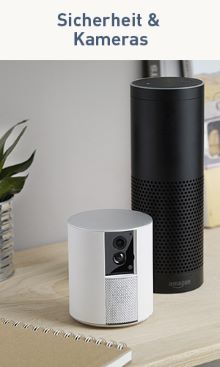
<td style="width:25%; vertical-align:top; text-align:center;"><a href="https://shop.somfy.de/produkte/sicherheit/kameras.html"><img src="{{media url="wysiwyg/ceba/Erweiterungen-TaHoma_Switch-Sicherheit_1.jpg"}}" alt="Sicherheit und Kameras" style="max-width:100%; height:auto; display:block; border-radius:3px;"></a></td>
</tr></tbody></table>
<p style="margin:16px 0 10px; font-size:15px;"><a style="color:#fab800; text-decoration:underline; font-weight:bold;" href="https://shop.somfy.de/smart-home-einstieg" target="_blank" rel="noopener">>> Zur Einstiegshilfe für Ihr Smart Home mit Use Cases und Produktempfehlungen</a></p>
<p style="margin:0; font-size:15px; color:#25485a; line-height:1.7;"><strong>Weitere Partner:</strong> Über die TaHoma Switch binden Sie weitere Anbieter ein, zum Beispiel Sonos-Lautsprecher in Ihre Szenarien.</p>
</div>
</div>EUR00https://shop.somfy.de/media/catalog/product/s/o/somfy-tahoma-switch.jpghttps://shop.somfy.de/media/catalog/product/t/a/tahoma_switch_wire_led_3-4.jpghttps://shop.somfy.de/media/catalog/product/t/a/tahoma-switch-smartphone-app-de_600x600_1_.jpg





 Livré chez vous le 02/03
 Livré chez vous le 05/03
 Livré chez vous le 06/03
 Livré chez vous le 08/03