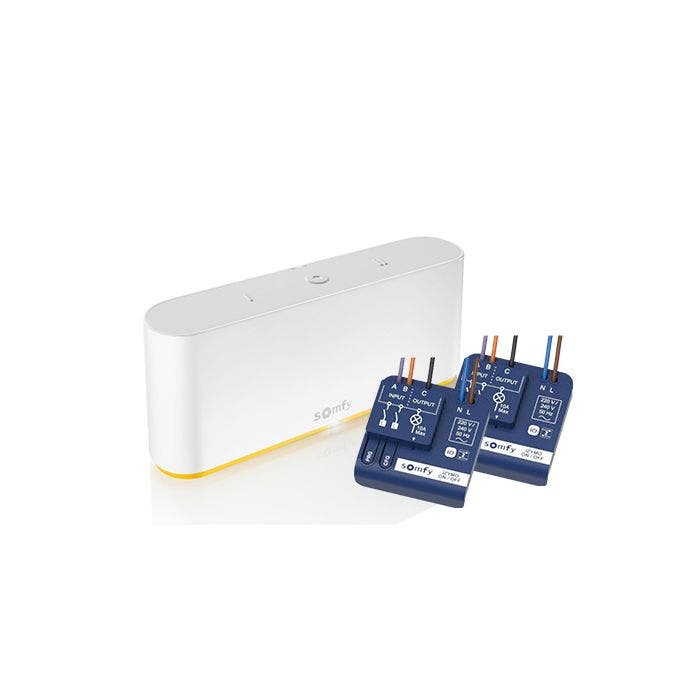
Mit dem TaHoma Kit Licht Unterputz bedienen Sie Ihre Beleuchtung und andere elektrische Geräte per Smartphone. Das Set besteht aus der Smart-Home-Zentrale TaHoma Switch und zwei Licht-Empfängern io. So schalten Sie zum Beispiel das Flurlicht bequem vom Sofa aus, ohne aufzustehen.
Unsere Unterputzempfänger: Der Licht-Empfänger io im Überblick
Nachrüsten ohne Umbau
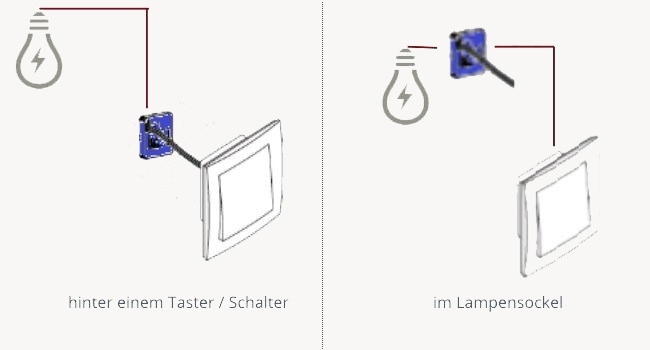
Unsichtbar hinter dem Schalter
Der Licht-Empfänger io wird hinter dem bestehenden Lichtschalter oder am Lampensockel angebracht. Ihre Schalter bleiben, ein Austausch ist nicht nötig. Da der Empfänger im Unterputz sitzt, ist er praktisch unsichtbar, ohne sichtbare Kabel oder Bauteile.
Von überall im Blick
Status prüfen und schalten per App
Über die TaHoma Switch sehen Sie jederzeit, auch von unterwegs, ob die Beleuchtung aus ist, und schalten sie bei Bedarf per Knopfdruck über die Somfy Smart Home-App.
Smarte Funktionen
Smarte Bedienung Ihrer Beleuchtung
Die Licht-Empfänger io schalten verschiedene Leuchten und elektrische Geräte ein und aus.
Intelligente Szenarien
Erstellen Sie in wenigen Schritten einen Ablauf von Ereignissen: Wird im Garten eine Bewegung erkannt (Somfy Bewegungsmelder nötig), schalten sich Ihre Lampen ein und Ihre Rollläden fahren herunter (Rollladen-Empfänger io nötig).
Mit der Somfy Smart Home-App rufen Sie jederzeit den Status Ihrer Produkte ab (Licht an/aus) und ändern ihn bei Bedarf. So brennt keine Beleuchtung unbemerkt, wenn Sie außer Haus sind.
Smart Home ausbauen
Weitere Geräte einbinden
Vernetzen Sie weitere Geräte mit der TaHoma Switch, zum Beispiel Rauchmelder oder Heizkörper-Thermostate, und richten Sie eigene Szenarien ein.
Sie steuern Ihre Rollläden noch nicht per Funk? Mit dem Somfy Rollladen-Empfänger io rüsten Sie Ihre verdrahteten Rollläden nach.
Immer aktuell
Regelmäßige Updates
Updates bringen neue Funktionen und erweiterte Kompatibilitäten, Sicherheitsupdates halten Ihre Zentrale aktuell.
Sie möchten Ihre TaHoma Switch nicht selbst einrichten?
Das müssen Sie nicht. Ein Somfy Techniker richtet Ihre TaHoma Switch gemeinsam mit Ihnen ein. Wählen Sie einfach den Weg, der zu Ihnen passt.
Per Telefon
Telefonische Inbetriebnahme
Gemeinsam mit einem Somfy Techniker per Telefon, an Ihrem Wunschtermin Schritt für Schritt Ihre TaHoma einrichten. Ohne Vorkenntnisse, am Ende läuft alles.
Ein Somfy Experte kommt zu Ihnen, richtet Ihr System direkt vor Ort ein und verbindet auf Wunsch weitere Zubehörprodukte. Ideal, wenn Sie alles fertig übergeben bekommen möchten.
io ca. 20 m, RTS ca. 15 m, jeweils durch zwei Betonwände
Integrierbare Produkte
200 Stück
Licht-Empfänger io
Anwendungsbereich
230-V-Geräte und Lampen, Rollläden, Markisen, Raffstore, Garagentore, Hoftore
Bedienbar über
Smartphones und Tablets mit iOS und Android (ab iOS 8.0 / Android 4.0.1), Download über
Weitere Smart-Funktionen
Einzelsteuerung, Gruppensteuerung, Zeitsteuerung, Erstellen von Abläufen
Immer auf dem neuesten Stand dank regelmäßiger Updates:
Freuen Sie sich auf neue Funktionen, erweiterte Kompatibilitäten und zusätzliche Smart-Home-Partner. Gleichzeitig wird das User Interface stetig optimiert, um die Bedienung Ihres Smart Homes noch komfortabler und intuitiver zu gestalten.
Mithilfe von regelmäßigen Sicherheitsupdates stellen wir zudem sicher, dass Ihre Smart-Home-Zentrale immer auf dem neuesten Stand bleibt und höchsten Sicherheitsanforderungen entspricht – für ein dauerhaft geschütztes und zuverlässiges Smart Home.
Fragen zur TaHoma Switch? Finden Sie hier Antworten auf die häufigsten Fragen:
Das Somfy TaHoma Kit Licht Unterputz ist mit allen Somfy Funk-Produkten mit io-homecontrol® und RTS kompatibel. Zusätzlich lassen sich Zigbee 3.0 und EnOcean integrieren; für EnOcean sind der USB Adapter für EnOcean sowie das TaHoma EnOcean Modul nötig.
Verbinden Sie die TaHoma mit Apple HomeKit und steuern Sie damit Ihre io-Antriebe (RTS-Antriebe nicht kompatibel). Die Produktkompatibilität kann je nach Land variieren.
Ein Somfy Techniker kommt zu Ihnen, richtet Ihr System vor Ort ein und verbindet auf Wunsch weiteres Zubehör. Ideal, wenn Sie alles fertig übergeben bekommen möchten.
Navigating through the elements of the carousel is possible using the tab key. You can skip the carousel or go straight to carousel navigation using the skip links.
Press to skip carousel
https://shop.somfy.de/somfy-tahoma-kit-licht-unterputz-v2.html?___store=DE_DE3505Somfy TaHoma Kit Licht Unterputzhttps://shop.somfy.de/media/catalog/product/2/0/202033_tahoma_kit_licht_unterputz.jpg330.28254EURInStock/Produkte/Smart Home/Produkte/Smart Home/Einstieg in Smart Home/Produkte/Angebote & Aktionen/Doppelpacks6046595565871548556604562<div style="color: #25485a;">
<p style="margin: 0 0 16px; font-size: 18px; font-weight: bold; color: #fab800; line-height: 1.35;">TaHoma Paket Licht Unterputz kaufen und 8 % sparen</p>
<p style="margin: 0 0 10px; color: #25485a;"><strong>Highlights:</strong></p>
<ul style="list-style: none; padding-left: 0; margin: 0 0 20px;">
<li style="margin: 0 0 10px; font-size: 15px; color: #25485a; line-height: 1.6;"><span style="color: #25485a; font-weight: bold;">✔</span> <strong style="color: #25485a;">Beleuchtung per App:</strong> Ihre Leuchten bequem per Smartphone bedienen, auch von unterwegs.</li>
<li style="margin: 0 0 10px; font-size: 15px; color: #25485a; line-height: 1.6;"><span style="color: #25485a; font-weight: bold;">✔</span> <strong style="color: #25485a;">Ohne Schalter-Austausch:</strong> schnell und einfach anzubringen, Ihre bestehenden Schalter bleiben.</li>
<li style="margin: 0 0 10px; font-size: 15px; color: #25485a; line-height: 1.6;"><span style="color: #25485a; font-weight: bold;">✔</span> <strong style="color: #25485a;">Unterputz:</strong> hinter dem Schalter verbaut und dadurch praktisch unsichtbar.</li>
<li style="margin: 0 0 10px; font-size: 15px; color: #25485a; line-height: 1.6;"><span style="color: #25485a; font-weight: bold;">✔</span> <strong style="color: #25485a;">Anwesenheitssimulation:</strong> Leuchten in intelligente Abläufe einbinden.</li>
<li style="margin: 0 0 10px; font-size: 15px; color: #25485a; line-height: 1.6;"><span style="color: #25485a; font-weight: bold;">✔</span> <strong style="color: #25485a;">Status in der App:</strong> jederzeit sehen, ob das Licht an oder aus ist.</li>
<li style="margin: 0 0 10px; font-size: 15px; color: #25485a; line-height: 1.6;"><span style="color: #25485a; font-weight: bold;">✔</span> <strong style="color: #25485a;">Erweiterbar:</strong> mit der <strong>TaHoma Switch</strong> weitere Geräte einbinden, zum Beispiel <a style="color: #fab800; text-decoration: underline;" title="Somfy smarte Heizung" href="https://shop.somfy.de/rund-um-tahoma/heizung.html" target="_blank" rel="noopener">Heizung</a> und <a style="color: #fab800; text-decoration: underline;" title="Somfy vernetzte Sicherheit" href="https://shop.somfy.de/rund-um-tahoma/sicherheit.html" target="_blank" rel="noopener">Sicherheitsprodukte</a>.</li>
<li style="margin: 0 0 10px; font-size: 15px; color: #25485a; line-height: 1.6;"><span style="color: #25485a; font-weight: bold;">✔</span> <strong style="color: #25485a;">Einrichten lassen:</strong> TaHoma auf Wunsch per <a style="color: #fab800; text-decoration: underline;" href="https://shop.somfy.de/telefonische-inbetriebnahme-tahoma-switch.html" target="_blank" rel="noopener">telefonischer Inbetriebnahme</a> durch einen Somfy Techniker.</li>
</ul>
<p style="margin: 16px 0 6px; color: #25485a;"><strong>Mehr Schalter smart machen oder mehr Smart Home?</strong></p>
<p style="margin: 0 0 6px;"><a style="color: #fab800; font-weight: bold; text-decoration: underline;" href="/licht-empfanger-io-an-aus.html" target="_blank" rel="noopener">>> Weiteren Licht-Empfänger io ergänzen</a></p>
<p style="margin: 0 0 16px;"><a style="color: #fab800; font-weight: bold; text-decoration: underline;" href="https://shop.somfy.de/rund-um-tahoma.html" target="_blank" rel="noopener">>> Rund um TaHoma: Zubehör entdecken</a></p>
<p style="margin: 16px 0 10px; color: #25485a;"> </p>
<p style="margin: 16px 0 10px; color: #25485a;"><strong>Kompatibel mit</strong></p>
<p style="margin: 0 0 8px;"><a href="/kompatibilitaet" target="_blank" rel="noopener"><img style="display: block;" src="{{media url=".renditions/wysiwyg/Product-Pages/Kompatibilitt_io_2_.png"}}" alt="Somfy Kompatibilität io" width="240" height="59"></a></p>
<p style="margin: 0 0 8px;"><a href="/kompatibilitaet" target="_blank" rel="noopener"><img style="display: block;" src="{{media url=".renditions/wysiwyg/Compatibility/Kompatibilitt_RTS.png"}}" alt="Somfy Kompatibilität RTS" width="240" height="59"></a></p>
<p style="margin: 0;"><a href="/kompatibilitaet" target="_blank" rel="noopener"><img style="display: block;" src="{{media url=".renditions/wysiwyg/Product-Pages/Kompatibilitt_Zigbee.png"}}" alt="Somfy Kompatibilität Zigbee" width="240" height="59"></a></p>
</div> <style>
@media (max-width:768px){
.sh-row{display:block !important;}
.sh-col{display:block !important;width:100% !important;padding:0 !important;margin-bottom:20px !important;}
.sh-col-img{display:block !important;width:100% !important;padding:0 !important;margin-bottom:16px !important;}
.sh-section{padding:28px 0 !important;}
.sh-h2{font-size:20px !important;}
.sh-h3{font-size:16px !important;}
.sh-ico-cell{display:block !important;width:100% !important;padding:0 !important;text-align:left !important;margin-bottom:8px !important;}
}
</style>
<div style="color: #25485a;"><!-- 1. Intro -->
<div class="sh-section" style="padding: 40px 0; border-bottom: 1px solid #e8e8e8;">
<p style="margin: 0 0 8px; font-size: 12px; font-weight: bold; letter-spacing: 0.12em; text-transform: uppercase; color: #fab800;">Smartes Licht, unsichtbar</p>
<h2 class="sh-h2" style="margin: 0 0 16px; font-size: 24px; font-weight: bold; line-height: 1.25; color: #25485a;">Licht smart und unsichtbar steuern</h2>
<p style="margin: 0; font-size: 15px; color: #25485a; line-height: 1.7;">Mit dem <strong>TaHoma Kit Licht Unterputz</strong> bedienen Sie Ihre Beleuchtung und andere elektrische Geräte per Smartphone. Das Set besteht aus der Smart-Home-Zentrale <a style="color: #fab800; text-decoration: underline;" title="Jetzt kaufen" href="/tahoma-switch.html" target="_blank" rel="noopener">TaHoma Switch</a> und zwei <a style="color: #fab800; text-decoration: underline;" title="Jetzt kaufen" href="/licht-empfanger-io-an-aus.html" target="_blank" rel="noopener">Licht-Empfängern io</a>. So schalten Sie zum Beispiel das Flurlicht bequem vom Sofa aus, ohne aufzustehen.</p>
</div>
<!-- 2. Video -->
<div class="sh-section" style="padding: 40px 0; border-bottom: 1px solid #e8e8e8;">
<h2 class="sh-h2" style="margin: 0 0 24px; font-size: 24px; font-weight: bold; line-height: 1.25; color: #25485a;">Unsere Unterputzempfänger: Der Licht-Empfänger io im Überblick</h2>
<div style="position: relative; width: 100%; padding-bottom: 56.25%; height: 0; overflow: hidden; border-radius: 3px;"><iframe style="position: absolute; top: 0; left: 0; width: 100%; height: 100%; border: 0;" title="Somfy Licht-Empfänger io" src="https://www.youtube.com/embed/mkQlMPYRfAQ" allow="accelerometer; autoplay; clipboard-write; encrypted-media; gyroscope; picture-in-picture" allowfullscreen="allowfullscreen"></iframe></div>
</div>
<!-- 3. Nachrüsten, Bild rechts -->
<div class="sh-section" style="padding: 40px 0; border-bottom: 1px solid #e8e8e8;">
<table class="sh-row" style="width: 100%; border-collapse: collapse;">
<tbody>
<tr>
<td class="sh-col" style="width: 50%; vertical-align: middle; padding-right: 40px;">
<p style="margin: 0 0 5px; font-size: 12px; font-weight: bold; letter-spacing: 0.12em; text-transform: uppercase; color: #fab800;">Nachrüsten ohne Umbau</p>
<h3 class="sh-h3" style="margin: 0 0 10px; font-size: 18px; font-weight: bold; color: #25485a; line-height: 1.3;">Unsichtbar hinter dem Schalter</h3>
<p style="margin: 0; font-size: 15px; color: #25485a; line-height: 1.7;">Der Licht-Empfänger io wird hinter dem bestehenden Lichtschalter oder am Lampensockel angebracht. Ihre Schalter bleiben, ein Austausch ist nicht nötig. Da der Empfänger im Unterputz sitzt, ist er praktisch <strong>unsichtbar</strong>, ohne sichtbare Kabel oder Bauteile.</p>
</td>
<td class="sh-col-img" style="width: 50%; vertical-align: middle;"><img style="display: block; width: 502px; max-height: 280px; object-fit: cover; border-radius: 3px;" src="{{media url="wysiwyg/ceba/1822649-schaubild-anwendung_1.jpg"}}" alt="Somfy Licht-Empfänger io Anwendung" height="249" loading="lazy"></td>
</tr>
</tbody>
</table>
</div>
<!-- 4. Von überall -->
<div class="sh-section" style="padding: 40px 0; border-bottom: 1px solid #e8e8e8;">
<p style="margin: 0px 0px 5px; font-size: 12px; font-weight: bold; letter-spacing: 0.12em; text-transform: uppercase; color: rgb(250, 184, 0); text-align: left;">Von überall im Blick</p>
<h3 class="sh-h3" style="margin: 0px 0px 10px; font-size: 18px; font-weight: bold; color: rgb(37, 72, 90); line-height: 1.3; text-align: left;">Status prüfen und schalten per App</h3>
<p style="margin: 0px; font-size: 15px; color: rgb(37, 72, 90); line-height: 1.7; text-align: left;">Über die <a style="color: #fab800; text-decoration: underline;" title="Jetzt TaHoma Switch entdecken" href="/tahoma-switch.html" target="_blank" rel="noopener">TaHoma Switch</a> sehen Sie jederzeit, auch von unterwegs, ob die Beleuchtung aus ist, und schalten sie bei Bedarf per Knopfdruck über die Somfy Smart Home-App.</p>
</div>
<!-- 5. Icon-Feature-Reihen: eine schlichte Tabelle mit Zebra-Streifen -->
<div class="sh-section" style="padding: 40px 0; border-bottom: 1px solid #e8e8e8;">
<p style="margin: 0px 0px 18px; font-size: 12px; font-weight: bold; letter-spacing: 0.12em; text-transform: uppercase; color: rgb(250, 184, 0); text-align: left;">Smarte Funktionen</p>
<table class="sh-row" style="width: 100%; border-collapse: collapse;">
<tbody>
<tr>
<td class="sh-ico-cell" style="width: 31.2406%; vertical-align: top; text-align: center; background: rgb(247, 247, 247); padding: 16px 18px;"><img style="height: 64px; width: auto; display: inline-block;" src="{{media url="wysiwyg/ceba/licht-grau-freigestellt_2.png"}}" alt="Smarte Bedienung"></td>
<td class="sh-col" style="width: 68.7594%; vertical-align: top; background: rgb(247, 247, 247); padding: 16px 18px; text-align: left;">
<h3 class="sh-h3" style="margin: 0px 0px 6px; font-size: 18px; font-weight: bold; color: rgb(37, 72, 90);">Smarte Bedienung Ihrer Beleuchtung</h3>
<p style="margin: 0px; font-size: 15px; color: rgb(37, 72, 90); line-height: 1.7;">Die Licht-Empfänger io schalten verschiedene Leuchten und elektrische Geräte ein und aus.</p>
</td>
</tr>
<tr>
<td class="sh-ico-cell" style="width: 31.2406%; vertical-align: top; text-align: center; padding: 16px 18px;"><img style="height: 64px; width: auto; display: inline-block;" src="https://shop.somfy.de/media/wysiwyg/ceba/somfy-ablaufe-starten.png" alt="Intelligente Szenarien"></td>
<td class="sh-col" style="width: 68.7594%; vertical-align: top; padding: 16px 18px; text-align: left;">
<h3 class="sh-h3" style="margin: 0 0 6px; font-size: 18px; font-weight: bold; color: #25485a;">Intelligente Szenarien</h3>
<p style="margin: 0; font-size: 15px; color: #25485a; line-height: 1.7;">Erstellen Sie in wenigen Schritten einen Ablauf von Ereignissen: Wird im Garten eine Bewegung erkannt (<a style="color: #fab800; text-decoration: underline;" href="/tahoma-bewegungsmelder-io.html" target="_blank" rel="noopener">Somfy Bewegungsmelder nötig</a>), schalten sich Ihre Lampen ein und Ihre Rollläden fahren herunter (<a style="color: #fab800; text-decoration: underline;" href="/unterputz-empfanger-rollladen-io.html" target="_blank" rel="noopener">Rollladen-Empfänger io nötig</a>).</p>
</td>
</tr>
<tr>
<td class="sh-ico-cell" style="width: 31.2406%; vertical-align: top; text-align: center; background: rgb(247, 247, 247); padding: 16px 18px;"><img style="height: 64px; width: auto; display: inline-block;" src="https://shop.somfy.de/media/wysiwyg/ceba/somfy-benachrichtigungen-erhalten.png" alt="Benachrichtigungen"></td>
<td class="sh-col" style="width: 68.7594%; vertical-align: top; background: rgb(247, 247, 247); padding: 16px 18px; text-align: left;">
<h3 class="sh-h3" style="margin: 0 0 6px; font-size: 18px; font-weight: bold; color: #25485a;">Benachrichtigungen</h3>
<p style="margin: 0; font-size: 15px; color: #25485a; line-height: 1.7;">Mit E-Mail- und Push-Benachrichtigungen sind Sie sofort informiert, zum Beispiel auf Wunsch im Alarmfall (<a style="color: #fab800; text-decoration: underline;" href="/offnungsmelder-slim-io.html" target="_blank" rel="noopener">kompatibler Somfy Öffnungsmelder nötig</a>).</p>
</td>
</tr>
<tr>
<td class="sh-ico-cell" style="width: 31.2406%; vertical-align: top; text-align: center; padding: 16px 18px;"><img style="height: 64px; width: auto; display: inline-block;" src="https://shop.somfy.de/media/wysiwyg/ceba/somfy-statusbericht-empfangen.png" alt="Statusbericht"></td>
<td class="sh-col" style="width: 68.7594%; vertical-align: top; padding: 16px 18px; text-align: left;">
<h3 class="sh-h3" style="margin: 0 0 6px; font-size: 18px; font-weight: bold; color: #25485a;">Statusbericht</h3>
<p style="margin: 0; font-size: 15px; color: #25485a; line-height: 1.7;">Mit der Somfy Smart Home-App rufen Sie jederzeit den Status Ihrer Produkte ab (Licht an/aus) und ändern ihn bei Bedarf. So brennt keine Beleuchtung unbemerkt, wenn Sie außer Haus sind.</p>
</td>
</tr>
</tbody>
</table>
</div>
<!-- 6. Erweitern -->
<div class="sh-section" style="padding: 40px 0; border-bottom: 1px solid #e8e8e8;">
<p style="margin: 0px 0px 5px; font-size: 12px; font-weight: bold; letter-spacing: 0.12em; text-transform: uppercase; color: rgb(250, 184, 0); text-align: left;">Smart Home ausbauen</p>
<h3 class="sh-h3" style="margin: 0px 0px 10px; font-size: 18px; font-weight: bold; color: rgb(37, 72, 90); line-height: 1.3; text-align: left;">Weitere Geräte einbinden</h3>
<p style="margin: 0px 0px 10px; font-size: 15px; color: rgb(37, 72, 90); line-height: 1.7; text-align: left;">Vernetzen Sie weitere Geräte mit der TaHoma Switch, zum Beispiel Rauchmelder oder Heizkörper-Thermostate, und richten Sie eigene Szenarien ein.</p>
<p style="margin: 0px; font-size: 15px; color: rgb(37, 72, 90); line-height: 1.7; text-align: left;">Sie steuern Ihre Rollläden noch nicht per Funk? Mit dem <a style="color: #fab800; text-decoration: underline;" href="/unterputz-empfanger-rollladen-io.html" target="_blank" rel="noopener">Somfy Rollladen-Empfänger io</a> rüsten Sie Ihre verdrahteten Rollläden nach.</p>
</div>
<!-- 7. Updates + FAQ -->
<div class="sh-section" style="padding: 40px 0; border-bottom: 1px solid #e8e8e8;">
<p style="margin: 0px 0px 5px; font-size: 12px; font-weight: bold; letter-spacing: 0.12em; text-transform: uppercase; color: rgb(250, 184, 0); text-align: left;">Immer aktuell</p>
<h3 class="sh-h3" style="margin: 0px 0px 10px; font-size: 18px; font-weight: bold; color: rgb(37, 72, 90); line-height: 1.3; text-align: left;">Regelmäßige Updates</h3>
<p style="margin: 0px 0px 10px; font-size: 15px; color: rgb(37, 72, 90); line-height: 1.7; text-align: left;">Updates bringen neue Funktionen und erweiterte Kompatibilitäten, Sicherheitsupdates halten Ihre Zentrale aktuell.</p>
<p style="margin: 0px; font-size: 15px; text-align: left;"><a style="color: #fab800; text-decoration: underline; font-weight: bold;" href="https://www.somfy.de/hilfe/faq?query=tahoma" target="_blank" rel="noopener">>> Zu den FAQs</a></p>
</div>
<!-- 8. Upsell -->
<div class="sh-section" style="padding: 40px 0;">
<div style="border: 1px solid #e8e8e8; border-left: 4px solid #fab800; border-radius: 3px; padding: 24px 28px;">
<p style="margin: 0 0 5px; font-size: 12px; font-weight: bold; letter-spacing: 0.12em; text-transform: uppercase; color: #fab800;">Erweitern</p>
<h3 class="sh-h3" style="margin: 0 0 12px; font-size: 18px; font-weight: bold; color: #25485a; line-height: 1.3;">Mehr Schalter smart machen oder mehr Smart Home?</h3>
<p style="margin: 0 0 6px;"><a style="color: #fab800; font-weight: bold; text-decoration: underline;" href="/licht-empfanger-io-an-aus.html" target="_blank" rel="noopener">>> Weiteren Licht-Empfänger io ergänzen</a></p>
<p style="margin: 0;"><a style="color: #fab800; font-weight: bold; text-decoration: underline;" href="https://shop.somfy.de/rund-um-tahoma.html" target="_blank" rel="noopener">>> Rund um TaHoma: Zubehör entdecken</a></p>
</div>
</div>
</div>
<style>
@media (max-width: 768px) {
.svc-two-row, .svc-two-cell { display: block !important; width: 100% !important; }
.svc-two-cell { margin-bottom: 14px !important; }
}
</style>
<div style="margin: 24px 0; border: 1px solid #e8e8e8; border-left: 4px solid #fab700; border-radius: 3px; background: #fff; padding: 24px 28px;">
<p style="margin: 0 0 5px; font-size: 11px; font-weight: bold; letter-spacing: 0.12em; text-transform: uppercase; color: #fab700;"><span style="font-size: 12px;">Lieber einrichten lassen</span></p>
<h3 style="margin: 0 0 10px; font-size: 20px; font-weight: bold; line-height: 1.25; color: ##25485a;"><span style="color: rgb(52, 73, 94);">Sie möchten Ihre TaHoma Switch nicht selbst einrichten?</span></h3>
<p style="margin: 0 0 20px; font-size: 15px; color: #444; line-height: 1.7;">Das müssen Sie nicht. Ein Somfy Techniker richtet Ihre TaHoma Switch gemeinsam mit Ihnen ein. Wählen Sie einfach den Weg, der zu Ihnen passt.</p>
<table class="svc-two-row" style="width: 100%; border-collapse: separate; border-spacing: 14px 0;">
<tbody>
<tr>
<td class="svc-two-cell" style="width: 50%; vertical-align: top; background: #f5f5f5; border-top: 3px solid #fab700; border-radius: 0 0 3px 3px; padding: 20px;">
<p style="margin: 0 0 4px; font-size: 11px; font-weight: bold; letter-spacing: 0.1em; text-transform: uppercase; color: #fab700;">Per Telefon</p>
<h4 style="margin: 0 0 8px; font-size: 17px; font-weight: bold; color: ##25485a;">Telefonische Inbetriebnahme</h4>
<p style="margin: 0 0 16px; font-size: 14px; color: #444; line-height: 1.65;">Gemeinsam mit einem Somfy Techniker per Telefon, an Ihrem Wunschtermin Schritt für Schritt Ihre TaHoma einrichten. Ohne Vorkenntnisse, am Ende läuft alles.</p>
<a style="display: inline-block; padding: 10px 20px; background: #fab700; color: #fff; font-size: 12px; font-weight: bold; letter-spacing: 0.06em; text-transform: uppercase; text-decoration: none; border-radius: 2px;" href="https://shop.somfy.de/telefonische-inbetriebnahme-tahoma-switch.html">Jetzt Buchen, 69 €</a></td>
<td class="svc-two-cell" style="width: 50%; vertical-align: top; background: #f5f5f5; border-top: 3px solid #25485a; border-radius: 0 0 3px 3px; padding: 20px;">
<p style="margin: 0 0 4px; font-size: 11px; font-weight: bold; letter-spacing: 0.1em; text-transform: uppercase; color: ##25485a;"><span style="color: rgb(52, 73, 94);">Bei Ihnen zu Hause</span></p>
<h4 style="margin: 0 0 8px; font-size: 17px; font-weight: bold; color: ##25485a;">Vor-Ort-Service</h4>
<p style="margin: 0 0 16px; font-size: 14px; color: #444; line-height: 1.65;">Ein Somfy Experte kommt zu Ihnen, richtet Ihr System direkt vor Ort ein und verbindet auf Wunsch weitere Zubehörprodukte. Ideal, wenn Sie alles fertig übergeben bekommen möchten. </p>
<a style="display: inline-block; padding: 10px 20px; background: transparent; color: #1b3a5b; font-size: 12px; font-weight: bold; letter-spacing: 0.06em; text-transform: uppercase; text-decoration: none; border: 2px solid #1b3a5b; border-radius: 2px;" href="https://www.somfy.de/hilfe/vor-ort-service">Mehr erfahren</a></td>
</tr>
</tbody>
</table>
</div>EUR00
659604Einstieg in Smart Homehttps://shop.somfy.de/produkte/smart-home/einstieg-in-smart-home.html?___store=DE_DE1/548/556/604/6591/Produkte/Smart Home/Einstieg in Smart Home






 Livré chez vous le 02/03
 Livré chez vous le 05/03
 Livré chez vous le 06/03
 Livré chez vous le 08/03